
Download Sassbook AI Writer – AI Writing Assistant, Content Generator, Free Trial Available
Overview of Sassbook AI Writer
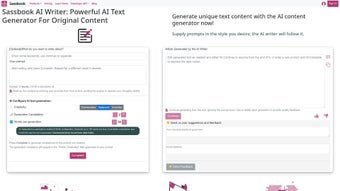
Sassbook AI Writer is a web‑based AI writing assistant that streamlines content creation across a wide range of formats. Designed for bloggers, marketers, social‑media managers, and anyone who regularly produces written material, the platform leverages advanced natural‑language models to generate drafts, headlines, ad copy, email newsletters, and even full‑length articles in seconds. Users simply provide a brief prompt, select the desired tone or style, and the engine returns multiple creative completions that can be edited, combined, or used as inspiration.
Because the tool is hosted in the cloud, there is no need for local installations or heavyweight hardware; a stable internet connection and a modern browser are enough to unlock the full feature set. The subscription model includes a free tier with limited daily generations, while paid plans unlock higher word limits, priority processing, and team collaboration features. Sassbook AI Writer’s core promise is to boost productivity while maintaining a high level of linguistic quality, making it a valuable addition to any digital‑content workflow.
Key Features That Set Sassbook AI Writer Apart
- Multi‑format generation – articles, blog posts, social media snippets, marketing copy, email drafts.
- Customizable tone & style controls – professional, casual, persuasive, SEO‑focused.
- Multiple completion options per prompt – choose the best fit or blend ideas.
- Real‑time collaboration – share drafts with teammates, add comments, and co‑edit.
- Built‑in plagiarism checker – ensure originality before publishing.
- SEO assistance – keyword suggestions and meta‑description generation.
- Version history – revert to previous drafts or compare variations.
- API access – integrate the writer into custom workflows or CMS platforms.
- Secure cloud storage – encrypted data handling and GDPR compliance.
- Regular updates – continuous model improvements and new language support.
Each feature is crafted to address a specific pain point in the content creation pipeline. For instance, the multi‑completion engine eliminates writer’s block by offering several distinct angles on a single topic, while the plagiarism checker saves time that would otherwise be spent on third‑party tools. The SEO assistance module automatically suggests primary and secondary keywords, helping writers produce content that ranks higher on search engines without needing separate optimization software. Moreover, the API gives developers the freedom to embed AI‑generated text directly into their own applications, turning Sassbook AI Writer into a versatile backend service rather than just a front‑end editor.
Installation & Usage Instructions for a Seamless Start
Step‑by‑Step Setup
- Visit the official Sassbook AI Writer website and click the “Sign Up” button.
- Choose between the free trial or a paid subscription plan that fits your monthly word‑count needs.
- Confirm your email address through the verification link sent to your inbox.
- Log in to the dashboard using your newly created credentials.
- Navigate to “New Project” and select the content type you wish to generate (e.g., blog post, ad copy).
- Enter a concise prompt, set the desired tone, and optionally upload reference material for context.
- Click “Generate” and wait a few seconds for the AI to produce multiple drafts.
- Review the suggestions, edit directly in the built‑in editor, or export the final version as .docx, .txt, or .html.
- If you need to collaborate, click “Share” and invite teammates by email; they can comment or edit in real time.
- For advanced users, generate an API key from the “Integrations” tab and follow the documentation to embed the service into your own workflow.
Because Sassbook AI Writer is entirely web‑based, there is no traditional installation process beyond creating an account and logging in. The interface is responsive and works equally well on desktop browsers, tablets, and smartphones, meaning you can draft copy on the go. The platform also offers a Chrome extension that adds a quick‑launch button to your browser toolbar, allowing you to open a writing window without navigating away from the page you’re currently browsing.
Tips for getting the most out of the tool include: (1) provide clear, specific prompts; the AI’s output quality correlates directly with input clarity. (2) Use the “tone” selector to match the voice of your brand, and (3) experiment with the “temperature” setting (available in advanced mode) to control creativity versus precision. Users who combine these techniques report up to a 60% reduction in time spent on first drafts and higher engagement metrics on published content.
Compatibility, Pros and Cons – What You Need to Know Before Downloading
Sassbook AI Writer runs in any modern web browser, making it compatible with Windows 10/11, macOS Ventura and later, Linux distributions with a graphical interface, as well as mobile operating systems like Android 8.0+ and iOS 13+. No additional plugins or extensions are required, though a stable internet connection (minimum 5 Mbps) is recommended for optimal performance. The service also supports Chrome, Firefox, Edge, and Safari, ensuring broad accessibility across both personal and corporate environments.
Pros
- Fast generation of high‑quality drafts across multiple content types.
- Intuitive UI with real‑time collaboration and version control.
- Built‑in SEO and plagiarism tools reduce the need for third‑party services.
- Scalable subscription plans suitable for freelancers to large agencies.
- Secure cloud storage and GDPR compliance protect sensitive data.
Cons
- Reliance on an internet connection; offline usage is not supported.
- Free tier imposes daily word limits that may be restrictive for heavy users.
- Advanced customization (e.g., fine‑tuned language models) is only available on higher‑price plans.
- Occasional generation of generic phrasing if prompts are too vague.
- Pricing can be higher than some one‑time‑purchase writing tools.
Overall, Sassbook AI Writer delivers a compelling blend of speed, flexibility, and integrated SEO features. While the need for an internet connection and the tiered pricing structure may deter some users, the productivity gains and quality of generated content make it a worthwhile investment for most digital marketers and content teams.
Frequently Asked Questions about Sassbook AI Writer
Is there a free version of Sassbook AI Writer?
Yes, Sassbook AI Writer offers a free tier that allows up to 5,000 words per month. The free plan includes basic generation, a limited number of completion options, and access to the plagiarism checker, making it ideal for occasional writers or those who want to test the platform before committing to a paid subscription.
Can I use Sassbook AI Writer offline?
No, the application is cloud‑based and requires an active internet connection to send prompts to the AI engine and retrieve generated content. Offline functionality is not currently supported.
How does the plagiarism checker work?
The built‑in plagiarism checker scans the generated text against a database of billions of web pages and academic sources. It highlights any matching segments and provides a similarity score, allowing users to make quick edits before publishing.
What languages does Sassbook AI Writer support?
Initially launched for English, the platform now supports Spanish, German, French, Italian, Portuguese, Dutch, and several other major languages. Language support continues to expand with each major model update.
Is there an API for developers?
Yes, paid plans include API access. Developers can generate an API key from the dashboard, and the documentation provides endpoints for text generation, tone adjustment, and plagiarism checking, enabling integration with custom CMSs, marketing automation tools, or internal workflows.
Conclusion – Should You Download Sassbook AI Writer?
If you regularly produce articles, marketing copy, or social‑media content, Sassbook AI Writer offers a powerful, cloud‑native solution that can dramatically reduce the time spent on first drafts. Its multi‑completion engine, SEO assistance, and collaborative features address the core challenges faced by modern content teams. While the reliance on an internet connection and the tiered pricing may be considerations, the overall value—especially for businesses that need consistent, high‑quality output—justifies the investment.
Ready to boost your productivity and elevate the quality of your writing? Download Sassbook AI Writer today, start with the free trial, and experience the future of AI‑assisted content creation.



.png)



